See every listing's Upgrade
The PoE MVP browser extension adds a box to each listing on the Path of Exile trade site showing what it does for your character - simulated in Path of Building - and ranks the listings by biggest upgrade and value per divine.
Path of Exile 1: works on the PoE1 trade site from extension version 0.4.0. Open your character's report here on poe1.poemvp.com first, then its trade searches.
Installieren - kostenlos
Chrome, Edge, Brave and Opera all install it from the Chrome Web Store. Firefox version coming soon.
Add to Chrome ↗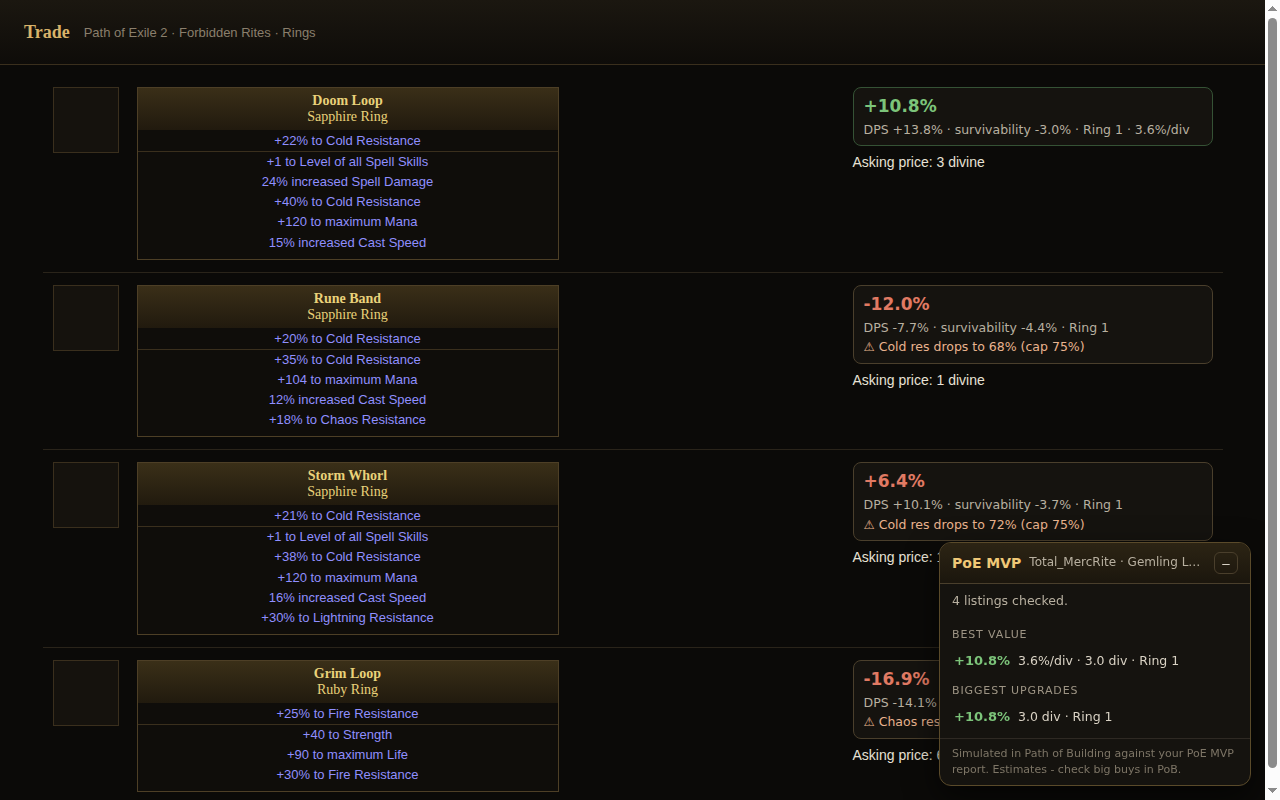
Benutzen
- Run your character here and open the report - the extension remembers that character.
- Open any trade search (the report's Exact target / Wider search buttons, or your own).
- Each listing shows its overall gain, DPS and survivability change, % per divine, and warnings like "Cold res drops under cap". The panel in the corner ranks them. Unlike the report's example items, these are real items for sale - scored for your character.
- Click the PoE MVP icon in your browser's toolbar any time to see your character's top upgrades with a Search button for each (from version 0.5).
Datenschutz
Only the items' mods and asking prices are sent to poemvp.com - never seller names, your account or anything about your login. The extension doesn't make requests to the trade site; it only reads the listings your page already loaded. Full privacy policy.
Installed it by hand before it was on the store?
Remove that copy in chrome://extensions and install from the store instead - the store version
updates itself, and two copies would both add boxes to every listing.
PoE MVP ist kostenlos und ohne Bezahlschranke. Wenn es dir Currency gespart hat, hilft ein Kaffee, den Server am Laufen zu halten.Auf Ko-fi unterstützen